1. Manage Approver Responsibilities within a Project
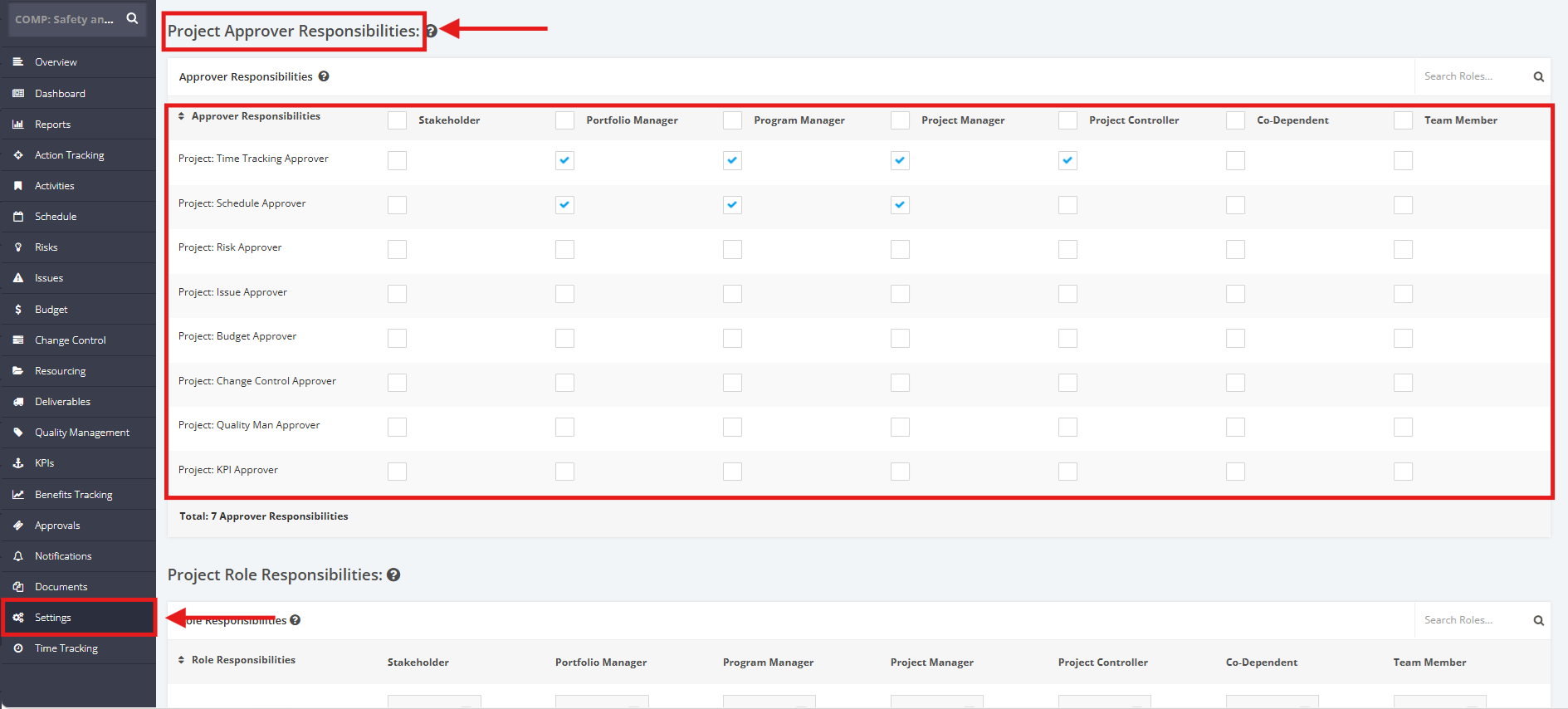
To manage the Approver Responsibilities, click the ‘Settings’ tab from the left side bar of the Project page.
Once done, navigate to the ‘Project Approver Responsibilities’ section.
Tick the checkboxes to make a Role an Approver to various modules or untick the checkboxes to remove Approver rights from a Role.
Note: There should be at least 1 Approver for each Responsibilities
Responsibilities include the following below:
- ‘Project: Time Tracking Approver’ – User receiving approval / rejection requests for all schedule updates during the running of a project (no 'approval' required if this user is the one doing the update)
- ‘Project: Schedule Approver’ – User receiving approval / rejection requests for all schedule updates during the running of a project (no 'approval' required if this user is the one doing the update)
- ‘Project: Risk Approver’ – User receiving approval / rejection requests for all risks during the running of a project (no 'approval' required if this user is the one doing the update)
- ‘Project: Issue Approver’ – User receiving approval / rejection requests for all issues during the running of a project (no 'approval' required if this user is the one doing the update)
- ‘Project: Budget Approver’ – User receiving approval / rejection requests for all cost updates during the running of a project (no 'approval' required if this user is the one doing the update)
- ‘Project: Change Control Approver’ – User receiving approval / rejection requests for all change request during the running of a project (no 'approval' required if this user is the one doing the update)
- ‘Project: Quality Man' Approver’ – User receiving approval / rejection requests for all quality updates during the running of a project (no 'approval' required if this user is the one doing the update)
- ‘Project: KPI Approver’ – User receiving approval / rejection requests for all KPI updates during the running of a project (no 'approval' required if this user is the one doing the update)